Vấn đề: git status trong git bash không hiển thị được tên file tiếng nhật
Git quotes any non-ascii character by default, not only asian ones. There's an option to disable this quoting behaviour.
You can disable it using the following command:
git config --global core.quotepath false
Or, alternatively, by adding the following snippet to your git config file ($HOME/.gitconfig usually)
[core]
    quotepath = false
After this, git should show your filenames exactly as they are.
As to your other problem, git not adding a file with asian characters, I can only guess that it has to do with the encoding that git uses is not the same as the encoding your terminal uses. I hope someone else can jump in and explain that bit.
----------


----------
Vấn đề: ls trong git bash sẽ không hiển thị được tên file tiếng nhật
By default, Git Bash makes Japanese files look garbled. However, it is not merely a garbled character, and Japanese is displayed as \xx (backslash digit) respectively.
Such a Japanese folder,
this is displayed.
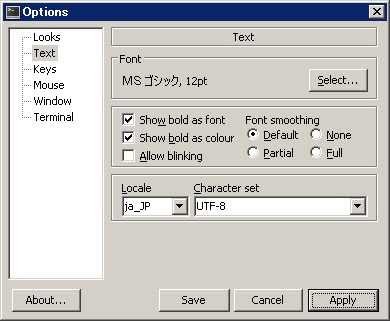
In this case, it is necessary to change the locale and font setting of Git Bash as the initial setting. Click the icon in the upper left corner of the window or right click on the screen and select Options.
Since it is empty like this by default, select ja_JP.
Also select MS Gothic from Font> Select.
This makes it possible to display Japanese without garbling.

chốt: chỉ cần tắt quoting
ReplyDeletegit config --global core.quotepath false
mấy cái cấu hình của bọn nhật đếch cần quan tâm