I have local & remote git repositories. I want to sync my local repository with remote repository so that my local repository becomes 100% copy of remote repository. Meaning that if certain files differ in these repos we override local ones with remote ones. And if there are files in local repos that do not exist in remote repo, local files get removed.
Is there a way to achieve that other than doing a fresh clone of remote repo?
Similar question as Sync local git repo with remote in one shot discarding local changes/commits.
| |||||
|


96
|
|
Pull and Fetch change
This section talks about how to fetch or pull change from the other repository. The difference between pull and fetch is:
Pull will merge remote branch change to local branch which tracked with remote branch. Fetch just get change from remote branch and never merge.
→ .
→ .
Pull\fetch Dialog will show.
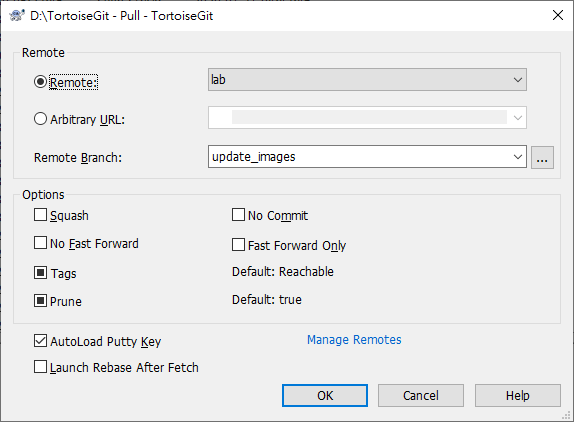
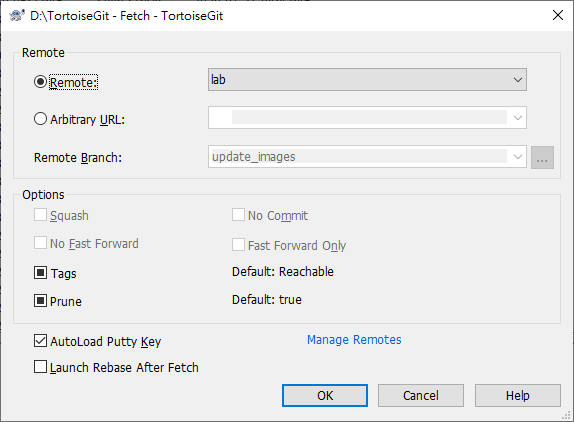
Remote: Choose Remote
Other: Input Other URL or local directory. You can click to browse directory.
If you check the Autoload Putty Key checkbox, Putty key will auto load by Pageant.
Manage Remotes to add or modify remote configuration.
Tags has three states (git 1.9 and later): Checked: All tags as well as branches are downloaded (--tags is passed to git), unchecked: No tags are downloaded (--no-tags is passed to git), and third state: use default behavior (based on remote
name.tagopt setting). Tagshas three states (prior to git 1.9): Only all tags are downloaded but no branches are downloaded (--tags is passed to git), unchecked: No tags are downloaded (--no-tags is passed to git), and third state: use default behavior (based on remote name.tagopt setting).
Prune has three states: True to remove remote-tracking branches which no longer exist on the remote, false: not to remove, and third state: use default behavior (based on remote
name.prune or fetch.prune setting).
Depth allows you to do a shallow pull/fetch on a shallow-clone repository with a specified depth.
